
RGHS claims, 2× faster and without missesRGHS क्लेम अब दोगुनी तेज़ी से, बिना गलती के
Sarthi opens beside the RGHS portal in Chrome. AI reads the prescription and bill and fills the OPD form, every query deadline gets an alert, and every rupee of payment and deduction is tracked — for your whole billing team.सारथी Chrome में RGHS पोर्टल के साथ खुलता है। AI पर्ची और बिल पढ़कर OPD फ़ॉर्म भरता है, हर query की डेडलाइन से पहले अलर्ट आता है, और हर पेमेंट-कटौती का हिसाब रहता है — पूरी बिलिंग टीम के लिए।
Sarthi at work — last 30 daysसारथी का काम — पिछले 30 दिन
Counted from real hospitals using Sarthi. Updated every hour.असली हॉस्पिटल के इस्तेमाल से गिना गया। हर घंटे अपडेट।
The billing desk loses hours on the portal every dayबिलिंग डेस्क का रोज़ घंटों का समय पोर्टल पर जाता है
Sarthi takes over the repeat work so your staff only checks and submits.सारथी दोहराने वाला काम संभालता है — आपका स्टाफ़ सिर्फ़ चेक करके Submit करता है।
😩 Without Sarthiसारथी के बिना
- Typing complaint, diagnosis, doctor and amount for every OPD claimहर OPD क्लेम में शिकायत, डायग्नोसिस, डॉक्टर, रकम हाथ से टाइप
- A query reply deadline passes and the claim gets rejectedQuery की डेडलाइन निकल गई, क्लेम रिजेक्ट
- Nobody knows which TID was paid, cut or is stuckकौन सा TID पास हुआ, कटा या अटका — पता नहीं
- Two PCs open the same TID and work twiceदो PC पर एक ही TID खुला, काम दोबारा
- Owner waits for month-end to know the numbersमालिक को महीने के आख़िर तक हिसाब नहीं मिलता
😊 With Sarthiसारथी के साथ
- AI reads the documents and fills the form — you just checkAI दस्तावेज़ पढ़कर फ़ॉर्म भरता है — आप बस चेक करें
- Red alert days before the deadline, reply text readyडेडलाइन से पहले लाल अलर्ट, जवाब का टेक्स्ट तैयार
- Paid, pending and deducted per TID with UTRहर TID का पास, बाकी, कटौती — UTR के साथ
- “TID open on Reception PC” warning, team chat and notes“यह TID रिसेप्शन PC पर खुला है” चेतावनी, टीम चैट और नोट्स
- Live dashboard and reports any timeकभी भी लाइव डैशबोर्ड और रिपोर्ट
Watch AI fill an OPD claimदेखिए AI कैसे OPD क्लेम भरता है
A sample prescription — press the button and see what Sarthi does in seconds.एक नमूना पर्ची — बटन दबाइए और देखिए सारथी कुछ सेकंड में क्या करता है।
C/O Fever, body ache × 3 days, cough
Dx Acute viral fever (URTI)
℞
- Tab Paracetamol 650 — 1-1-1 × 5d
- Tab Cetirizine 10 — 0-0-1 × 5d
- Syp Ambroxol — 10 ml TDS
Dr. A. K. VermaMD (Medicine) · RMC 12345
Everything the RGHS billing desk needsRGHS बिलिंग डेस्क की हर ज़रूरत, एक जगह
Tap a section to see the real screen.किसी भी हिस्से पर टैप करें और असली स्क्रीन देखें।
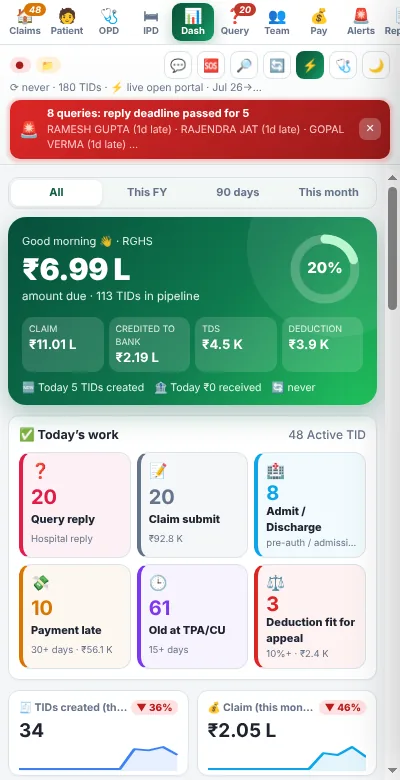
Know where every rupee isहर रुपये का हिसाब, एक स्क्रीन पर
Amount due, credited to bank, TDS and deduction — with the work waiting for you today.बकाया, बैंक में जमा, TDS और कटौती — साथ में आज का बचा हुआ काम।
- Today’s work: queries, submits, admit/discharge, late paymentsआज का काम: query, submit, एडमिट/डिस्चार्ज, देर वाले पेमेंट
- This FY / 90 days / this month filtersइस FY / 90 दिन / इस महीने के फ़िल्टर
- Trend cards with month-on-month changeमहीने-दर-महीने बदलाव वाले ट्रेंड कार्ड
Drop the papers, AI fills the claimकाग़ज़ डालिए, क्लेम AI भरेगा
Pick the patient folder — AI reads prescription and bill and fills chief complaint, diagnosis, doctor, dates and amount. A checklist shows what is still missing before you press Submit.मरीज़ का फ़ोल्डर चुनें — AI पर्ची और बिल पढ़कर शिकायत, डायग्नोसिस, डॉक्टर, तारीख और रकम भरता है। Submit से पहले चेकलिस्ट बताती है क्या बाकी है।
- Doctor profiles with RMC verifyRMC वेरिफ़ाई के साथ डॉक्टर प्रोफ़ाइल
- Checks: validity, declaration, bill amount, duplicate submitजाँच: वैधता, डिक्लेरेशन, बिल रकम, डबल submit
- Proof PDF saved in the patient folderमरीज़ के फ़ोल्डर में Proof PDF

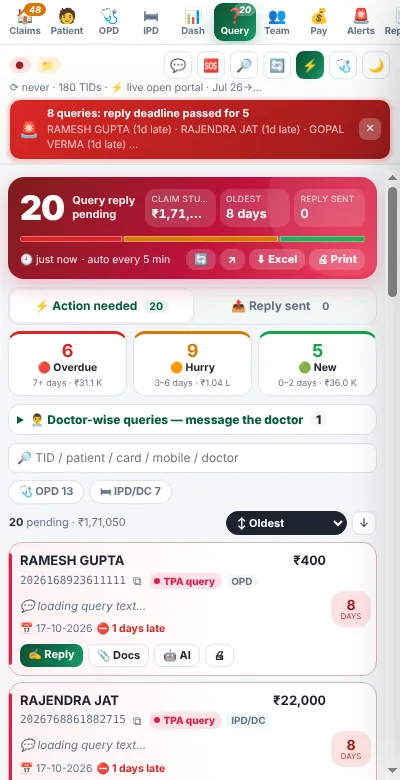
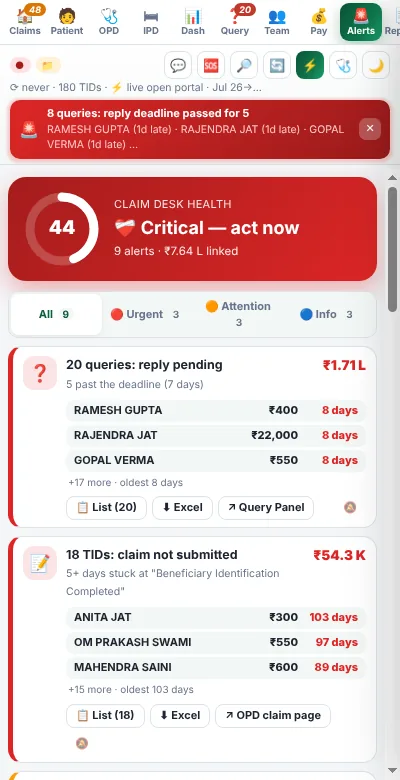
Every query, sorted by urgencyहर query, ज़रूरत के हिसाब से
Overdue, hurry and new — with days left, amount stuck and the doctor to ask. Reply text and same-query history are one tap away.ओवरड्यू, जल्दी और नई — बचे दिन, अटकी रकम और किस डॉक्टर से पूछना है। जवाब का टेक्स्ट और पुरानी वैसी query एक टैप पर।
- Doctor-wise query list to send on WhatsAppडॉक्टर-वार query लिस्ट WhatsApp पर भेजें
- Excel and print of pending queriesबाकी query की Excel और प्रिंट
- Alerts on PC and Telegram / WhatsAppPC और Telegram / WhatsApp पर अलर्ट
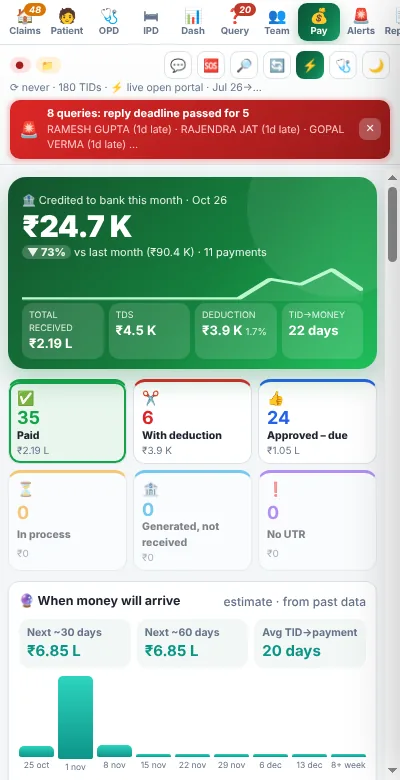
Catch every deduction in time to appealहर कटौती पकड़ें, अपील का समय रहते
Per-TID payment status with UTR and bank credit, late payments and deductions worth appealing.हर TID का पेमेंट स्टेटस, UTR और बैंक क्रेडिट, देर वाले पेमेंट और अपील लायक कटौती।
- Deduction reasons and appeal deadlinesकटौती के कारण और अपील की आख़िरी तारीख
- TDS and bank credit summaryTDS और बैंक क्रेडिट का सार
- One-click Excel for the accountantअकाउंटेंट के लिए एक क्लिक Excel
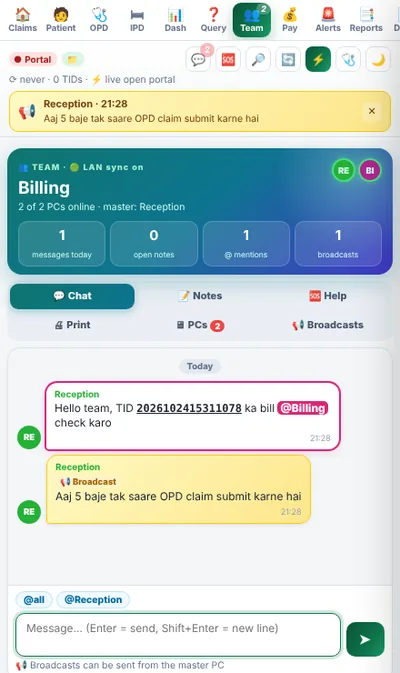
Five PCs, one billing deskपाँच PC, एक बिलिंग डेस्क
All PCs share data through a folder on your own network. One master PC syncs the portal for everyone.सारे PC आपके अपने नेटवर्क के फ़ोल्डर से डेटा शेयर करते हैं। एक मास्टर PC सबके लिए पोर्टल सिंक करता है।
- “TID open on another PC” warning“TID दूसरे PC पर खुला है” चेतावनी
- Team chat, TID notes, broadcasts and @mentionsटीम चैट, TID नोट्स, ब्रॉडकास्ट और @mention
- Send print to the printer PC, one-tap helpप्रिंटर वाले PC पर प्रिंट भेजें, एक टैप में मदद
The portal, watched for youपोर्टल पर नज़र, आपकी जगह
New TIDs, status changes, new queries and payments show up as they happen — on the PC and on your phone.नए TID, स्टेटस बदलाव, नई query और पेमेंट तुरंत दिखते हैं — PC पर भी और फ़ोन पर भी।
- Desktop notification and soundडेस्कटॉप नोटिफ़िकेशन और आवाज़
- Telegram / WhatsApp to the ownerमालिक को Telegram / WhatsApp
- Scheduled syncs (e.g. 1:30 pm, 9 pm)तय समय पर सिंक (जैसे 1:30, रात 9)
Month-end numbers, any dayमहीने का हिसाब, किसी भी दिन
Doctor-wise claims and share, monthly summary, deduction reasons and pending work.डॉक्टर-वार क्लेम और हिस्सा, मासिक सार, कटौती के कारण और बाकी काम।
- Doctor share reportडॉक्टर शेयर रिपोर्ट
- Month and FY summaryमहीना और FY सार
- Excel / printExcel / प्रिंट

Built only for RGHS hospitalsसिर्फ़ RGHS हॉस्पिटल के लिए बना
AI OPD auto-fillAI OPD ऑटो-फ़िल
Reads prescription and bill, fills the portal form.पर्ची और बिल पढ़कर पोर्टल फ़ॉर्म भरता है।
Query trackerQuery ट्रैकर
Deadlines, ready replies and history.डेडलाइन, तैयार जवाब और इतिहास।
Payment and deductionपेमेंट और कटौती
UTR, bank credit, appeal reminders.UTR, बैंक क्रेडिट, अपील रिमाइंडर।
IPD / day careIPD / डे केयर
Admit, discharge and pre-auth status.एडमिट, डिस्चार्ज और प्री-ऑथ स्टेटस।
Proof PDFProof PDF
A record of what was submitted and when.क्या और कब submit हुआ — उसका रिकॉर्ड।
Patient foldersमरीज़ फ़ोल्डर
Documents picked and named for you.दस्तावेज़ अपने-आप चुने और नाम दिए।
Live portal watchलाइव पोर्टल वॉच
New TIDs and changes within a minute.नए TID और बदलाव एक मिनट में।
Phone alertsफ़ोन अलर्ट
Telegram / WhatsApp for the owner.मालिक के लिए Telegram / WhatsApp।
LAN team syncLAN टीम सिंक
All PCs share one data folder.सारे PC एक डेटा फ़ोल्डर शेयर करते हैं।
Team chat and notesटीम चैट और नोट्स
Per-TID notes, @mentions, broadcasts.TID नोट्स, @mention, ब्रॉडकास्ट।
Printer PCप्रिंटर PC
Any PC prints on the PC with the printer.कोई भी PC, प्रिंटर वाले PC पर प्रिंट।
Reports and Excelरिपोर्ट और Excel
Doctor share, monthly, deductions.डॉक्टर शेयर, मासिक, कटौती।
Start in 5 minutes5 मिनट में शुरू
No server, no software install on the network — just Chrome.न सर्वर, न कोई भारी सॉफ़्टवेयर — बस Chrome।
Add to ChromeChrome में जोड़ें
Install Sarthi from the link we send (Chrome or Edge on Windows).हमारे भेजे लिंक से सारथी इंस्टॉल करें (Windows पर Chrome या Edge)।
1 minमिनटOpen the portalपोर्टल खोलें
Log in to RGHS as usual and click the Sarthi icon — the side panel opens.RGHS में हमेशा की तरह लॉगिन करें और सारथी आइकन दबाएँ — साइड पैनल खुलेगा।
1 minमिनटFill the setupसेटअप भरें
Hospital name and mobile — the 7-day trial starts at once.हॉस्पिटल का नाम और मोबाइल — 7 दिन का ट्रायल तुरंत शुरू।
2 minमिनटPress Start syncStart sync दबाएँ
Your claims, queries and payments appear in a few minutes.कुछ मिनट में आपके क्लेम, query और पेमेंट दिखने लगते हैं।
✓ doneहो गयाHow much time can your desk save?आपकी डेस्क कितना समय बचा सकती है?
Rough estimate: about 6 minutes saved per OPD claim and 4 minutes per query, 26 working days. Your numbers may differ.मोटा अनुमान: हर OPD क्लेम पर ~6 मिनट और हर query पर ~4 मिनट की बचत, 26 कार्य-दिवस। आपके आँकड़े अलग हो सकते हैं।
How much money slips away every month?हर महीने कितना पैसा हाथ से निकल जाता है?
These are your own assumptions. Sarthi shows every deduction with its reason and appeal deadline, and alerts you before query deadlines. Average claim taken as ₹1,500.ये आपके अपने अनुमान हैं। सारथी हर कटौती कारण और अपील तारीख के साथ दिखाता है, और query डेडलाइन से पहले अलर्ट देता है। औसत क्लेम ₹1,500 माना है।
Manual work vs Sarthiहाथ से काम बनाम सारथी
| Taskकाम | Manualहाथ से | Sarthi |
|---|---|---|
| Fill an OPD claimOPD क्लेम भरना | 8–10 min of typing8–10 मिनट टाइपिंग | ✓ ~2 min — AI fills, you check~2 मिनट — AI भरे, आप चेक करें |
| Find queries close to deadlineडेडलाइन वाली query ढूँढना | Open TIDs one by oneएक-एक TID खोलकर | ✓ Sorted list + red alertछँटी लिस्ट + लाल अलर्ट |
| Check payment and deductionपेमेंट और कटौती देखना | Portal pages + bank statementपोर्टल पेज + बैंक स्टेटमेंट | ✓ Per TID with UTR, one Excelहर TID, UTR के साथ, एक Excel |
| Work on 3–5 PCs3–5 PC पर काम | Same TID done twiceएक TID दो बार | ✓ Shared data + “open elsewhere” lockशेयर्ड डेटा + “दूसरी जगह खुला” लॉक |
| Owner’s monthly numbersमालिक का मासिक हिसाब | Excel at month-endमहीने के आख़िर में Excel | ✓ Live dashboard any dayरोज़ लाइव डैशबोर्ड |
What changes on your billing deskआपकी बिलिंग डेस्क पर क्या बदलता है
Morning sync, by itselfसुबह का सिंक, अपने-आप
The master PC pulls all TIDs, queries and payments. Everyone sees today’s work list.मास्टर PC सारे TID, query और पेमेंट लाता है। सबको आज के काम की लिस्ट दिखती है।
Query alertQuery अलर्ट
“3 queries due tomorrow” — on the PC and the owner’s phone, with ready reply text.“3 query कल तक” — PC पर और मालिक के फ़ोन पर, जवाब के टेक्स्ट के साथ।
OPD rushOPD की भीड़
AI fills each claim from the papers. Staff check and submit — about 2 minutes each.AI काग़ज़ों से हर क्लेम भरता है। स्टाफ़ चेक करके submit करता है — लगभग 2 मिनट में।
Deduction caughtकटौती पकड़ी
A ₹1,200 deduction shows up with reason and appeal deadline — appeal filed the same day.₹1,200 की कटौती कारण और अपील तारीख के साथ दिखी — उसी दिन अपील।
Owner’s reportमालिक की रिपोर्ट
Today’s claims, money credited and pending work — one tap, or straight to Telegram.आज के क्लेम, जमा रकम और बाकी काम — एक टैप में, या सीधे Telegram पर।
Sarthi was not built in an office far away. It was built on a real RGHS billing desk in Rajasthan, for the problems we faced every day — missed queries, typing the same details again and again, and not knowing which payment was cut. It is used there every day.सारथी किसी दूर के ऑफ़िस में नहीं बना। यह राजस्थान की एक असली RGHS बिलिंग डेस्क पर बना — उन्हीं परेशानियों के लिए जो हम रोज़ झेलते थे: छूटती query, वही जानकारी बार-बार टाइप करना, और यह न पता होना कि कौन सा पेमेंट कटा। वहाँ यह रोज़ चलता है।
— Subhash KalerFounder, RGHS Sarthiसंस्थापक, RGHS SarthiNew in Sarthiसारथी में नया
Updates come by themselves in Chrome — no reinstall, no extra charge.अपडेट Chrome में अपने-आप आते हैं — न दोबारा इंस्टॉल, न अलग चार्ज।
PC name by itselfPC का नाम अपने-आप
Each PC takes its Windows user name — no typing at setup.हर PC अपना Windows यूज़र नाम ले लेता है — सेटअप में टाइप नहीं करना।
Cleaner menuसाफ़ मेन्यू
The top menu always fits the side panel — nothing gets cut.ऊपर का मेन्यू हमेशा साइड पैनल में पूरा दिखता है।
AI only when you want itAI तभी, जब आप चाहें
No Gemini key? AI buttons stay hidden. Add a key and they appear.Gemini key नहीं? AI बटन छिपे रहते हैं। key लगाते ही दिखते हैं।
Ideas & votesआइडिया और वोट
Suggest a feature inside Sarthi and vote — the most wanted is built first.सारथी के अंदर फ़ीचर सुझाएँ और वोट करें — सबसे ज़्यादा माँगा गया पहले बनता है।
🗺 Coming nextआगे क्या आ रहा है
Planned — order decided by hospitals’ votesयोजना में — क्रम हॉस्पिटल के वोट से तयBring a hospital — get 30 days freeएक हॉस्पिटल लाइए — 30 दिन फ्री पाइए
Every Sarthi license has its own referral code (Settings → License). When a hospital starts with your code and makes its first payment, your license gets 30 extra days — for every hospital, no limit.हर सारथी लाइसेंस का अपना रेफ़रल कोड होता है (Settings → License)। जब कोई हॉस्पिटल आपके कोड से शुरू करके पहला पेमेंट करता है, आपके लाइसेंस में 30 दिन जुड़ जाते हैं — हर हॉस्पिटल पर, कोई सीमा नहीं।
Every feature in every planहर प्लान में हर फ़ीचर
Choose only how many PCs. Prices include GST, updates and WhatsApp support.बस PC की गिनती चुनें। प्राइस में GST, अपडेट और WhatsApp सपोर्ट शामिल।
1 PC1 PC
- 1 PC at the same timeएक साथ 1 PC
- AI OPD auto-fillAI OPD ऑटो-फ़िल
- Queries, payments, IPD, reportsQuery, पेमेंट, IPD, रिपोर्ट
- Live alerts + phone alertsलाइव अलर्ट + फ़ोन अलर्ट
- Proof PDF, Excel exportProof PDF, Excel एक्सपोर्ट
3 PCs3 PC
- 3 PCs at the same timeएक साथ 3 PC
- AI OPD auto-fillAI OPD ऑटो-फ़िल
- Queries, payments, IPD, reportsQuery, पेमेंट, IPD, रिपोर्ट
- Live alerts + phone alertsलाइव अलर्ट + फ़ोन अलर्ट
- Team sync, chat, printer PCटीम सिंक, चैट, प्रिंटर PC
Unlimited PCsअनलिमिटेड PC
- Any number of PCsकितने भी PC
- AI OPD auto-fillAI OPD ऑटो-फ़िल
- Queries, payments, IPD, reportsQuery, पेमेंट, IPD, रिपोर्ट
- Live alerts + phone alertsलाइव अलर्ट + फ़ोन अलर्ट
- Team sync, chat, printer PCटीम सिंक, चैट, प्रिंटर PC
🎁 7-day free trial with 3 PCs — no payment needed to start.7 दिन का फ्री ट्रायल, 3 PC तक — शुरू करने के लिए कोई पेमेंट नहीं।
Your data. Your control.आपका डेटा, आपके हाथ में
Patient data stays on your PCsमरीज़ का डेटा आपके PC पर
Claims and documents are kept on your computer and your own shared folder. Our server only checks the license.क्लेम और दस्तावेज़ आपके कंप्यूटर और आपके अपने शेयर्ड फ़ोल्डर में रहते हैं। हमारा सर्वर सिर्फ़ लाइसेंस चेक करता है।
Nothing is submitted by itselfअपने-आप कुछ Submit नहीं होता
Sarthi fills and checks. The Save / Submit button on the portal is always pressed by your staff.सारथी भरता और जाँचता है। पोर्टल का Save / Submit बटन हमेशा आपका स्टाफ़ दबाता है।
Your own AI keyआपकी अपनी AI key
OPD Auto-Fill uses your free Google Gemini key. Documents go only to Google’s AI for reading — never to us.OPD ऑटो-फ़िल आपकी फ्री Google Gemini key से चलता है। दस्तावेज़ सिर्फ़ पढ़ने के लिए Google AI को जाते हैं — हमें कभी नहीं।
Questions hospitals askहॉस्पिटल अक्सर पूछते हैं
Does Sarthi submit claims by itself?क्या सारथी अपने-आप क्लेम submit करता है?
No. Sarthi fills and checks — the Save / Submit button on the portal is always pressed by you.नहीं। सारथी भरता और जाँचता है — पोर्टल पर Save / Submit हमेशा आप दबाते हैं।
Where is our patient data kept?मरीज़ का डेटा कहाँ रहता है?
On your own computer, and in your shared folder if you use many PCs. Our server stores only license details: hospital name, contact, PCs and payments.आपके अपने कंप्यूटर पर, और कई PC हों तो आपके शेयर्ड फ़ोल्डर में। हमारे सर्वर पर सिर्फ़ लाइसेंस की जानकारी रहती है: हॉस्पिटल का नाम, संपर्क, PC और पेमेंट।
Do we need an AI key?क्या AI key चाहिए?
Only for OPD Auto-Fill. A free Google Gemini key takes 2 minutes — the setup shows how. Everything else works without it.सिर्फ़ OPD ऑटो-फ़िल के लिए। फ्री Google Gemini key 2 मिनट में बनती है — सेटअप में तरीका दिखाया है। बाकी सब बिना key के चलता है।
Which computers does it work on?किन कंप्यूटर पर चलता है?
Windows PCs with Google Chrome or Microsoft Edge. For many PCs, a shared folder on your office network (LAN) is enough — no server needed.Google Chrome या Microsoft Edge वाले Windows PC पर। कई PC के लिए ऑफ़िस नेटवर्क (LAN) का एक शेयर्ड फ़ोल्डर काफ़ी है — सर्वर की ज़रूरत नहीं।
What happens when the license ends?लाइसेंस ख़त्म होने पर क्या होगा?
Sarthi keeps working for 2 more days so your work does not stop, then it pauses until you renew. Your data is never deleted — renew and everything is back at once.काम न रुके, इसलिए सारथी 2 दिन और चलता है, फिर रिन्यू होने तक रुक जाता है। आपका डेटा कभी नहीं मिटता — रिन्यू करते ही सब तुरंत वापस।
How do we pay?पेमेंट कैसे करें?
Online (UPI, card, net banking) on the Buy page, or by UPI with the reference number. You get a GST invoice.ख़रीदें पेज पर ऑनलाइन (UPI, कार्ड, नेट बैंकिंग), या UPI से रेफ़रेंस नंबर के साथ। आपको GST इनवॉइस मिलता है।
Can we move to another PC?क्या दूसरे PC पर ले जा सकते हैं?
Yes — remove the old PC in Settings → License (or ask us) and start Sarthi on the new one.हाँ — Settings → License में पुराना PC हटाएँ (या हमें बताएँ) और नए PC पर सारथी चालू करें।
Is this an official RGHS product?क्या यह RGHS का आधिकारिक प्रोडक्ट है?
No. Sarthi is an independent helper tool. It is not made, approved or endorsed by RGHS or the Government of Rajasthan.नहीं। सारथी एक स्वतंत्र सहायक टूल है। यह RGHS या राजस्थान सरकार द्वारा बनाया, मंज़ूर या समर्थित नहीं है।
See Sarthi on your own portalअपने ही पोर्टल पर सारथी देखें
Leave your number — we call or WhatsApp you, set it up on your PC and show the team how to use it.अपना नंबर छोड़ें — हम कॉल या WhatsApp करेंगे, आपके PC पर सेट करेंगे और टीम को चलाना सिखाएँगे।
- ✓ 15–20 minute screen-share demo15–20 मिनट का स्क्रीन-शेयर डेमो
- ✓ Setup help for all your PCsसारे PC पर सेटअप में मदद
- ✓ Hindi / English supportहिंदी / English सपोर्ट
Give your billing desk a Sarthiअपनी बिलिंग डेस्क को दीजिए एक सारथी
7 days free. All features. Set up in 5 minutes.7 दिन फ्री। सारे फ़ीचर। 5 मिनट में सेटअप।