ECHS claims का काम
आधे समय में, बिना गलती
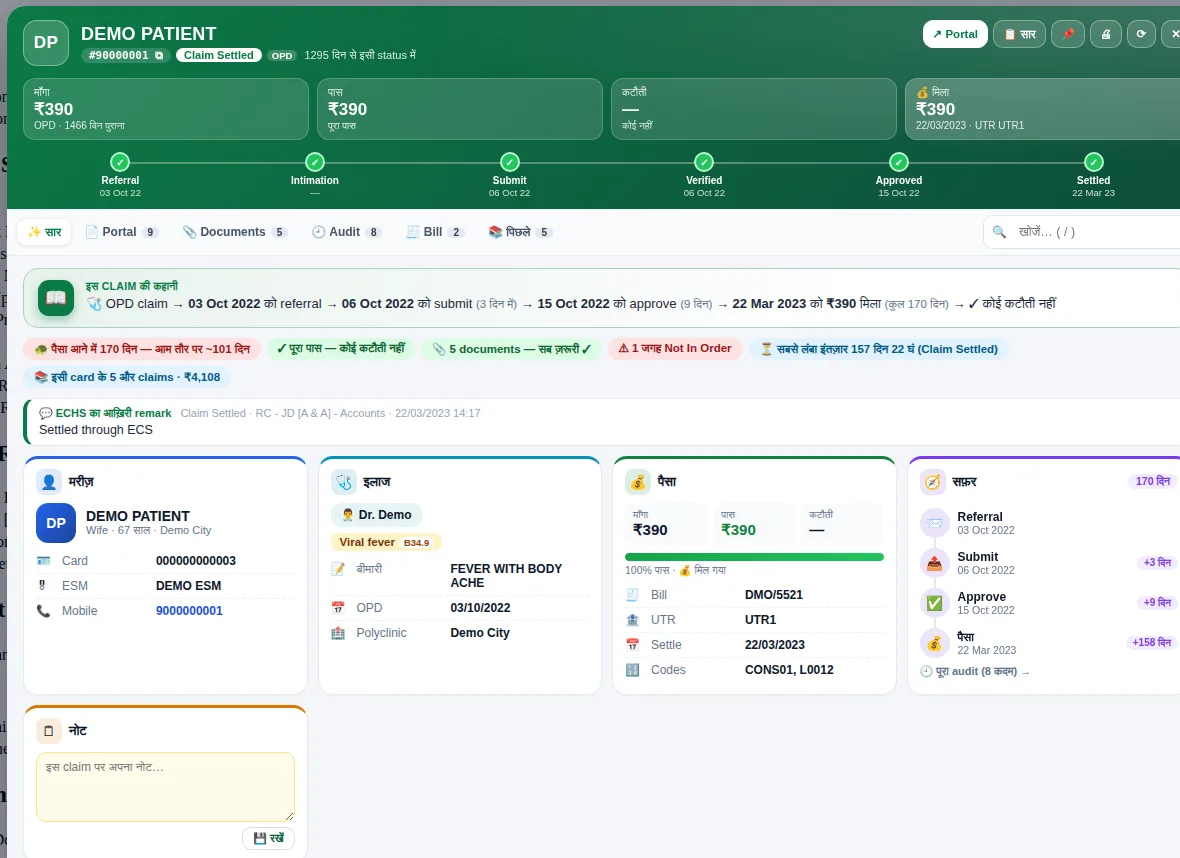
सब claims एक जगह, AI से form भरना, submit से पहले पूरी जाँच, documents, NMI tracking और reports — hospital staff के लिए, portal के ठीक बगल में।
- v5.6.9नया version
- 0updates अब तक
- 6tabs में claim
- 0auto-submit
 ✅ Claim check पास
⟳ हर 2 मिनट sync
🤖 AI ने 3 documents पढ़े
काम करते देखें
रोज़ के काम की छोटी झलक — सिर्फ़ नमूना data।
रोज़ के claims वाले काम का हर हिस्सा
जो काम पहले portal के दस page खोलकर होता था, अब एक side panel में।
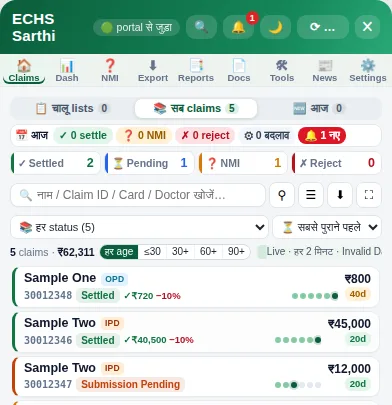
सब claims एक जगह
हर status के claims एक list में — हर 2 मिनट चुपचाप sync, चालू lists, age / रकम से छाँटना, एक click में Excel।
और जानें → 🧾Claim की पूरी कहानी
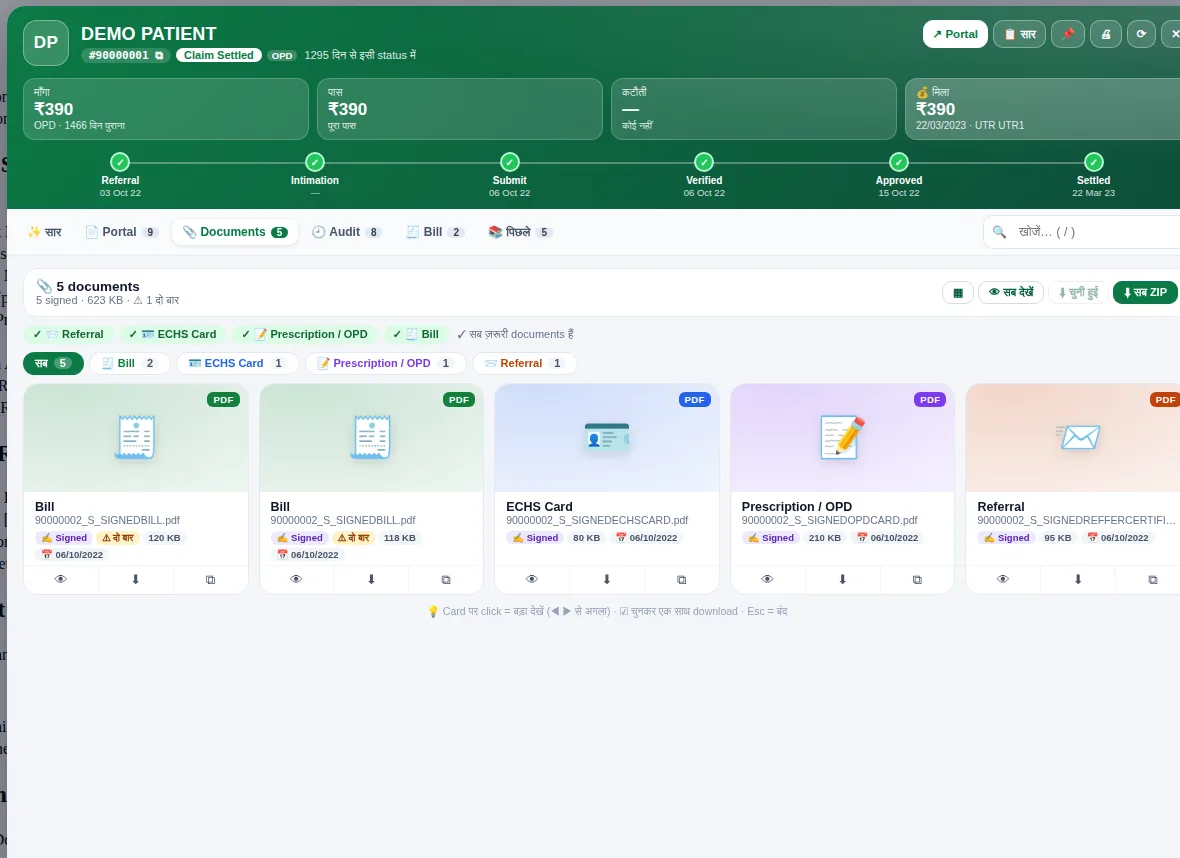
एक claim की हर बात full screen पर — सार, Portal, Documents, Audit, Bill और पिछले claims, 6 tabs में।
और जानें → 🤖AI से form भरना
Bill, prescription, discharge summary पढ़कर fields और expense worksheet भर देता है। हर field आप जाँचकर ही आगे बढ़ते हैं।
और जानें → ✅Submit से पहले जाँच
ज़रूरी documents, रकम, तारीख़ें, codes और signed copies की जाँच — गलती हो तो साफ़ शब्दों में कारण।
और जानें → 📎Documents आसान
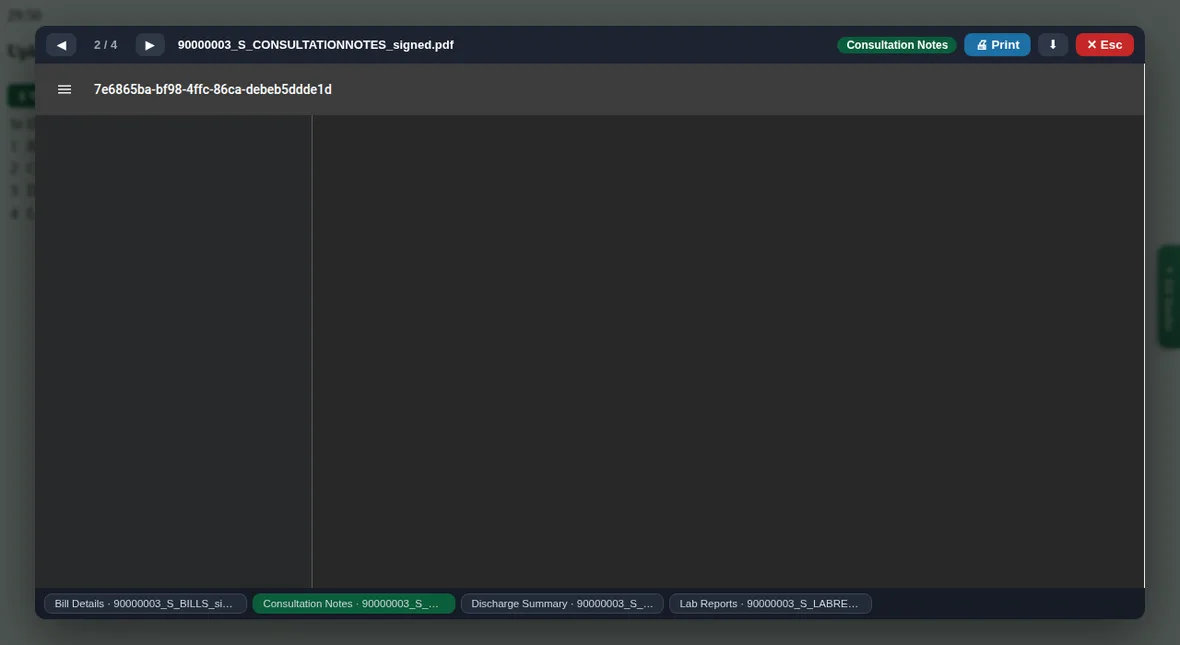
एक साथ upload (file का नाम वही रहता है), portal की table में View, preview से Print, सब documents का ZIP।
और जानें → ❓NMI / Query tracking
किस claim पर query आई, कितने दिन बचे, कौन-से documents माँगे — बार-बार वाली query अलग, reply templates तैयार।
और जानें → 🕘Audit timeline
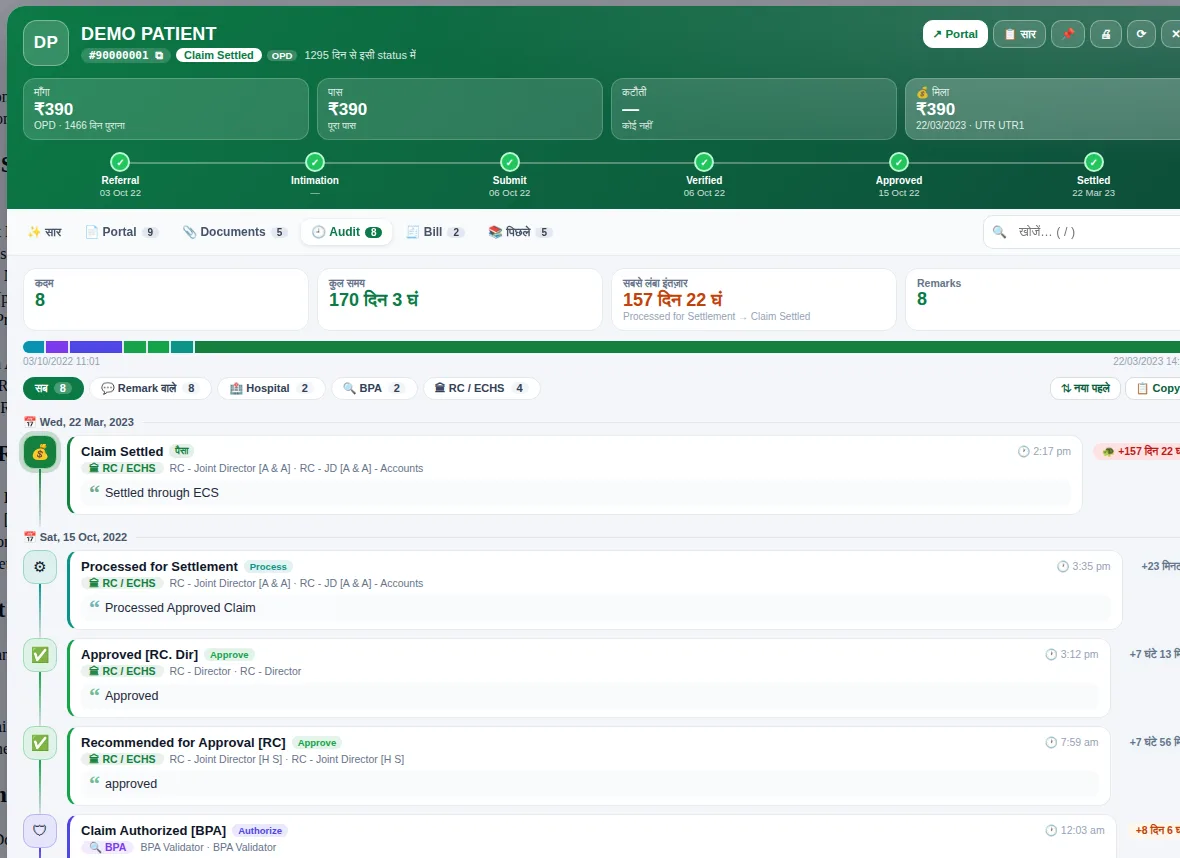
Claim हर कदम पर कितने दिन रुका, किसके पास था, सबसे लंबा इंतज़ार कहाँ — एक नज़र में।
और जानें → 💰Bill और settlement
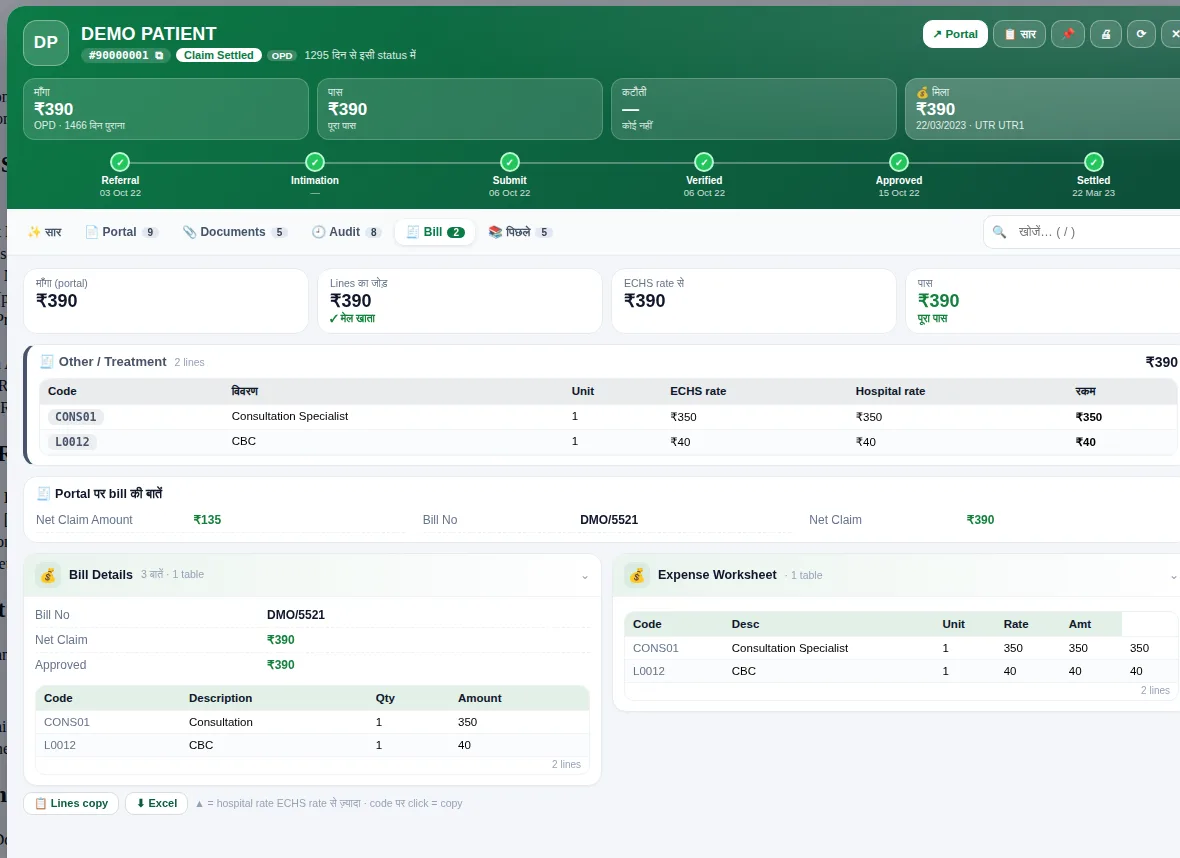
Submit हुए package / procedure codes, ECHS rate से तुलना, कटौती और UTR — सब एक जगह।
और जानें → 📊Reports और Excel
Dashboard, अपने-आप export, cover sheet, letters और महीने के reports — बिना हाथ से जोड़े।
और जानें → 🔔सूचना केंद्र
नया NMI, reject या settle होते ही सूचना। Mobile पर सिर्फ़ गिनती वाला सार — कभी मरीज़ का नाम नहीं।
और जानें → ⌘Command palette
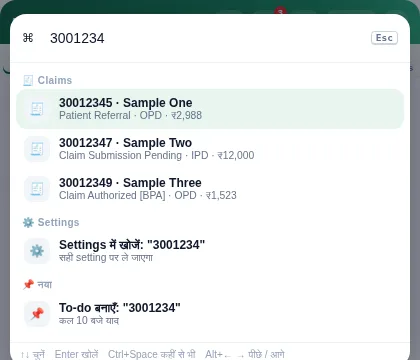
Ctrl+Space दबाएँ और कोई भी claim, tool या setting एक box से खोलें।
और जानें → 📈Staff analytics
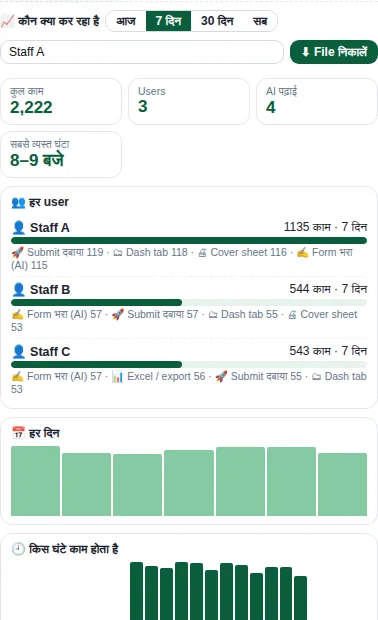
किस user ने क्या और कितना काम किया, किस घंटे सबसे ज़्यादा काम — सिर्फ़ गिनती, उसी computer पर।
और जानें →देखिए, कैसा दिखता है
सभी तस्वीरें बनावटी नमूना data से हैं — कोई असली मरीज़, अस्पताल या claim नहीं।
Portal पर हाथ से बनाम ECHS Sarthi
चार कदम, रोज़ का काम
- 1
Portal पर login
हमेशा की तरह ECHS BPA portal पर login करें। दाईं ओर ◂ ES Sarthi बटन से side panel खुलता है।
- 2
सब claims अपने-आप
हर status के claims हर 2 मिनट चुपचाप ताज़ा होते हैं — NMI, reject, settle की सूचना तुरंत।
- 3
भरें और जाँचें
Documents चुनें, AI fields भरता है, आप जाँचते हैं। Submit से पहले Check हर गलती दिखाता है।
- 4
आप submit करें
आख़िरी Submit आप खुद दबाते हैं। उसके बाद claim का पूरा सफ़र — audit, bill, पैसा — extension में दिखता रहता है।
भरोसे के साथ बनाया गया
Hospital का claims data संवेदनशील है — इसलिए कुछ नियम कभी नहीं टूटते।
✔ यह करता है
- Portal पर आपके खुले session में claims पढ़कर एक जगह दिखाता है
- आपके कहने पर form भरता है और documents upload करता है
- Submit से पहले जाँच और साफ़ कारण दिखाता है
- Claims data उसी computer पर; backup में API keys / PIN नहीं जाते
- Claim form खुला हो तो बीच में कोई दखल नहीं
✕ यह कभी नहीं करता
- Claim अपने-आप submit नहीं करता
- CAPTCHA नहीं तोड़ता, password नहीं भरता या रखता
- मरीज़ों का data इस website या हमारे किसी server पर नहीं भेजता
- ICD code अपने-आप नहीं चुनता, file का नाम नहीं बदलता
- Mobile सूचना में मरीज़ का नाम नहीं — सिर्फ़ गिनती
लगातार बेहतर होता हुआ
107 updates अब तक — नीचे सबसे नए।
- v5.6.9
- Tools → Analytics: new “Export file” button — saves a counts-only usage file that you can upload to the admin panel yourself (the extension never sends it anywhere)
- v5.6.8
- “View” button next to every file in the portal’s documents table — preview, print, close with Esc
- v5.6.7
- The ◂ ES Sarthi button now always opens — falls back to an in-page panel if the side panel can’t open; reminder to press F5 after a reload
- v5.6.6
- Redesigned Bill tab — submitted package / procedure codes, comparison with ECHS rates, Excel export
- v5.6.5
- Redesigned Previous Claims tab — family view, year-wise totals, timeline
लगाना और नया version डालना
🆕 पहली बार
- Unzip the file — you’ll get an
ECHS_Sarthifolder. Keep it in a permanent place (e.g. D:\ECHS_Sarthi) - Open
chrome://extensionsin Chrome and turn on Developer mode (top right) - Click Load unpacked and select the
ECHS_Sarthifolder - Open the portal and log in — ◂ ES Sarthi appears on the right
⬆ नया version
- Replace the files inside the same
ECHS_Sarthifolder (not a new folder) - In
chrome://extensionspress ↻ Reload — never Remove (that deletes your data) - If a claim form is open on the portal, Save it first, then press F5
- Reopen the side panel — “What’s new” will appear
📦 Download
v5.6.9
Download सिर्फ़ hospitals के लिए है — नीचे enquiry भेजें, link आपको दिया जाएगा।
📩 Link माँगेंअक्सर पूछे जाने वाले सवाल
What is ECHS Sarthi?
A Google Chrome (and Microsoft Edge) extension that simplifies hospital claim work on the ECHS BPA portal — claim lists, checks, documents, NMI and reports, all in one side panel.
Does it submit claims automatically?
No. You always press Submit yourself. The extension helps fill the form and shows a check before submission, but the final decision is always yours.
Does the extension enter the portal password or CAPTCHA?
No. You enter the login, password and CAPTCHA yourself. The extension neither stores nor fills them.
Where is patient data kept?
Claim information stays on the same computer, in Chrome’s extension storage. Neither this website nor any server of ours receives it. If you use AI reading, only the documents you choose are sent to the AI service of your own API key — see the Privacy Policy for details.
On how many computers can it run?
On every computer where portal work is done. Each computer keeps its own data, and backup / restore lets you move it from one to another.
How do I install a new version?
Replace the files in the same ECHS_Sarthi folder → press ↻ Reload in chrome://extensions (never Remove) → if a claim form is open, Save it → press F5 → reopen the side panel.
What if the portal design changes?
The extension uses several methods to cope with portal changes, and a new version is released quickly when needed — every change is listed in the Changelog.
कोई सवाल? बात करें
Demo, जानकारी, समस्या या सुझाव — form भरें, जवाब जल्दी मिलेगा।